RESTAURANT BUMP BAR BUILT FOR BUSY KITCHENS
Give kitchen employees a fast, dependable way to move through digital instructions, portioning workflows, and on-screen tasks without slowing down production. A restaurant bump bar places simple physical controls at the workstation, helping staff advance steps, confirm actions, and stay focused when speed matters most.
Make every tap intentional and every kitchen workflow easier to follow.
WHAT IS A RESTAURANT BUMP BAR?
A restaurant bump bar is a compact, durable keypad designed for use alongside a kitchen display, training screen, or digital workflow system. Instead of reaching for a touchscreen repeatedly, employees use clearly assigned physical keys to move forward, go back, confirm a step, or complete a task.
In fast-paced foodservice environments, those simple controls can make digital systems easier to use. The employee stays at the station, keeps attention on the work in front of them, and interacts with the screen through a device built for repetitive kitchen use.
KEEP DIGITAL KITCHEN WORKFLOWS MOVING
Restaurant technology is most valuable when it makes work easier rather than adding another obstacle. During a rush, employees need controls they can understand immediately. A well-designed kitchen bump bar reduces the number of decisions required to navigate on-screen instructions.
With straightforward physical inputs, staff can advance through a recipe, confirm a portion, acknowledge an instruction, or return to a previous step without searching through menus. The result is a smoother interaction between the employee and the digital system.
BENEFITS OF A BUMP BAR IN RESTAURANT OPERATIONS
A restaurant bump bar can help foodservice teams create faster, cleaner, and more repeatable workflows. Key advantages include:
- Quick physical navigation through digital job aids and prep steps
- Less dependence on repeated touchscreen interaction
- Controls that are easy to understand during busy shifts
- Improved consistency when employees follow multi-step procedures
- Faster confirmation of completed tasks and portioning steps
- A practical interface for employees wearing gloves
- Better support for training new kitchen staff
- A durable control method for high-volume foodservice environments
PHYSICAL CONTROLS FOR REAL KITCHEN CONDITIONS
A restaurant kitchen is not an office. Employees may be wearing gloves, handling ingredients, moving between stations, and working around heat, moisture, flour, grease, and frequent cleaning. Controls used in that environment need to be simple and practical.
A physical bump bar gives staff tactile feedback they can recognize without pausing to study the screen. Responsive keys help employees work confidently even when the kitchen is loud, the line is moving quickly, or the display is positioned slightly outside their direct reach.
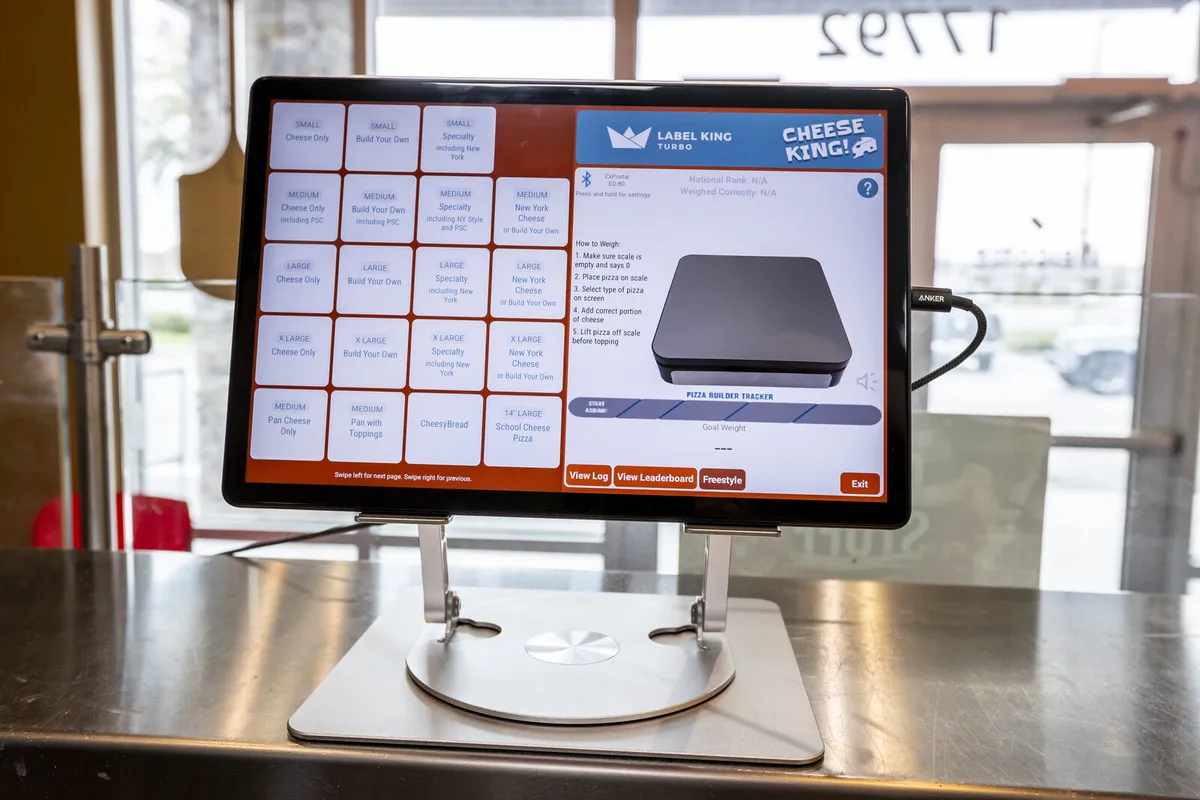
USE A RESTAURANT BUMP BAR WITH DIGITAL JOB AIDS
Digital job aids can guide employees through recipes, preparation procedures, station setup, and other repeatable kitchen tasks. The bump bar becomes the employee's control point for that guided workflow.
Employees can move from one instruction to the next as they complete the work. This supports a learn-by-doing approach in which the process remains visible at the station rather than buried in a binder or dependent on a manager repeating directions.
SUPPORT MORE CONSISTENT PORTIONING
When a bump bar is integrated into a portion-control workflow, employees can move through each step while confirming that the required action has been completed. This is especially useful for restaurants managing high-cost ingredients or recipes where small inconsistencies add up across hundreds of orders.
Label King Turbo's connected portion-control and training platform combines on-screen job aids, an integrated bump bar, and wireless scale functionality. This gives operators a structured way to guide employees toward repeatable portions while keeping the workflow easy to follow.
REDUCE TOUCHSCREEN CONTACT AT THE WORKSTATION
Touchscreens are useful for displaying recipes, images, target weights, and step-by-step instructions. They are not always the most convenient control surface when an employee is actively preparing food.
A kitchen bump bar allows common actions to be completed through physical keys. That can reduce unnecessary screen contact and help keep the display available for the information employees need to see.
MAKE TRAINING EASIER FOR NEW EMPLOYEES
New hires often need to learn recipes, portions, equipment, timing, and station routines at the same time. A complicated interface creates another layer of training. A restaurant bump bar keeps navigation straightforward.
When the controls correspond to simple actions such as next, back, confirm, or complete, employees can focus on learning the actual kitchen process. Managers spend less time explaining software navigation and more time coaching food quality, safety, and execution.
BUILT FOR PIZZERIAS, QSRS, AND HIGH-VOLUME FOODSERVICE
Restaurant bump bars are especially valuable in operations where employees repeat the same workflows many times per shift. This includes pizza restaurants, quick-service restaurants, fast-casual concepts, cafeterias, ghost kitchens, commissaries, and franchise locations.
At a pizza station, for example, employees may use a connected workflow to follow build instructions and verify ingredient portions. In another kitchen, the bump bar may help staff advance through preparation steps or workstation procedures. The exact workflow can vary, but the goal remains the same: make the correct action easier to complete.
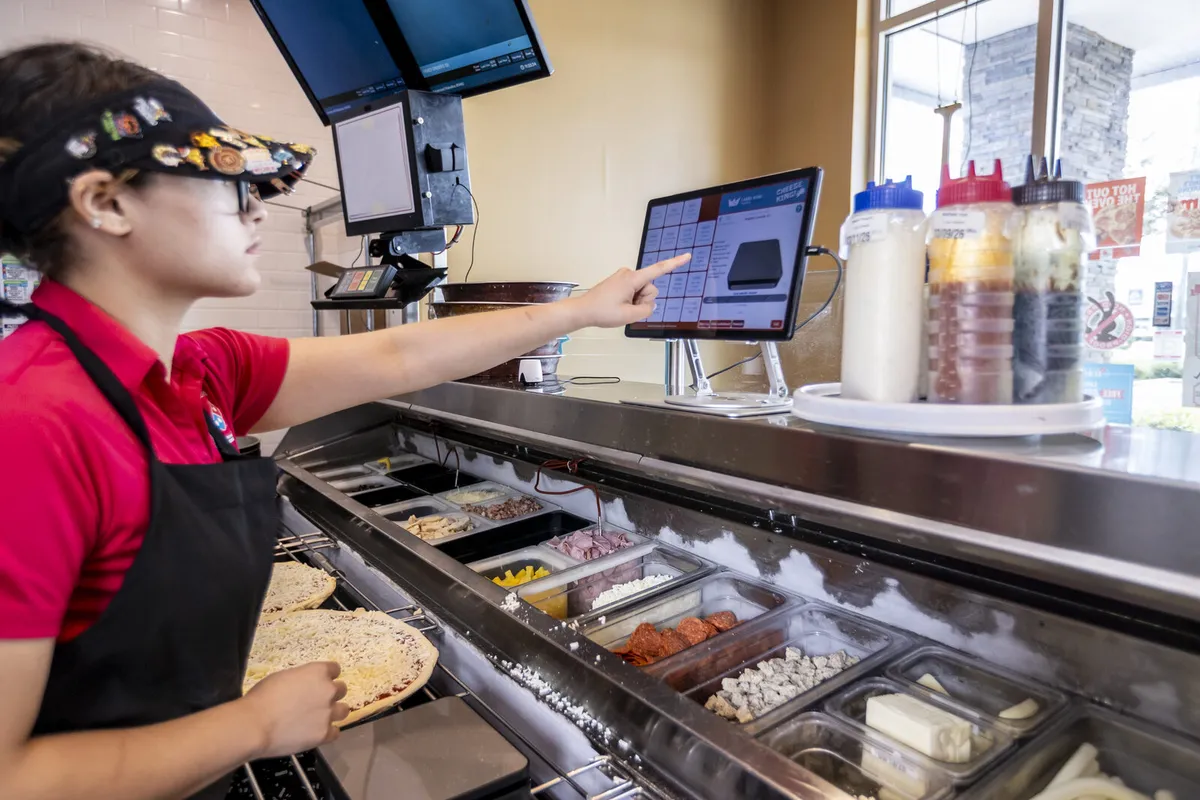
STANDARDIZE WORKFLOWS ACROSS MULTIPLE LOCATIONS
Franchise and multi-unit operators need processes that can be repeated from one location to another. A consistent combination of on-screen instructions and physical controls helps each kitchen use the same basic workflow.
That consistency can reduce variation caused by different training styles, handwritten notes, or verbal shortcuts. Employees encounter familiar controls, while operators gain a more standardized way to present and complete important procedures.
CHOOSE A BUMP BAR THAT FITS THE COMPLETE WORKFLOW
A bump bar should not be evaluated only as a keypad. Its value depends on how well it works with the software, display, training content, portioning process, and daily tasks around it.
Look for a restaurant bump bar solution that offers durable hardware, intuitive key assignments, easy cleaning, responsive controls, and integration with the kitchen workflow your staff actually uses. The best system should reduce friction instead of requiring employees to adapt their work around the technology.
BUMP BAR VS. TOUCHSCREEN-ONLY NAVIGATION
| Kitchen Task | Touchscreen Only | With a Bump Bar |
|---|---|---|
| Advance to the next instruction | Employee reaches for and taps the display | Employee presses a dedicated physical key |
| Use while wearing gloves | May require more precise screen contact | Tactile keys provide a clear input |
| Repeat common actions | Frequent screen interaction | Simple actions stay on dedicated controls |
| Train a new employee | Navigation and process are learned together | Basic controls make the workflow easier to follow |
| Work during a rush | Visual menus may add friction | Physical controls support quick, repeatable actions |
A CONNECTED APPROACH FROM LABEL KING TURBO
Label King Turbo develops restaurant kitchen technology around the way restaurant employees actually work. The company's portion-control and training platform combines visual job aids, connected weighing, and an integrated bump bar to support guided preparation at the station — alongside tools like the food labeling system that keep the rest of the kitchen organized.
Rather than treating the bump bar as a stand-alone accessory, this approach makes it part of a complete workflow. Employees see the instruction, complete the task, use the physical control to move forward, and continue through the process with less confusion.
BRING SIMPLER CONTROLS TO YOUR KITCHEN
A restaurant bump bar can make digital kitchen tools easier to use, particularly when employees need to move quickly and repeat the same actions throughout the day. With clear physical controls at the workstation, your team can spend less time navigating technology and more time preparing consistent food.
Talk with Label King Turbo about adding an integrated bump bar and guided workflow to your restaurant operation.
FREQUENTLY ASKED QUESTIONS
What is a restaurant bump bar?
A restaurant bump bar is a compact physical keypad used to control a kitchen display, job-aid system, or other digital workflow. Staff can use assigned keys to advance, return, confirm, or complete on-screen steps.
What is a bump bar used for in a kitchen?
It can be used to navigate orders, recipes, preparation instructions, training steps, portion-control workflows, and other tasks displayed on a kitchen screen.
Does a bump bar replace a touchscreen?
Not necessarily. A bump bar often works alongside a touchscreen or display. The screen presents information, while the bump bar provides quick physical controls for common actions.
Can employees use a bump bar while wearing gloves?
Physical keys are often easier to operate while wearing gloves than small touchscreen controls. Employees should still follow the restaurant's handwashing, glove-use, and sanitation procedures.
Can a restaurant bump bar help with training?
Yes. Simple controls can make guided digital job aids easier for new employees to follow. This allows the trainee to focus on the recipe or procedure instead of learning a complicated software interface.
Is a bump bar useful for portion control?
Yes. When integrated with digital instructions and a connected scale, a bump bar can help employees move through portioning steps and confirm completed actions.
Which restaurants benefit most from bump bars?
Bump bars can be useful in pizzerias, quick-service restaurants, fast-casual kitchens, cafeterias, commissaries, ghost kitchens, and multi-location foodservice operations with repeatable production workflows.
Can the same bump bar workflow be used across multiple locations?
A standardized system can help multi-unit operators present the same instructions and controls across locations, making training and execution more consistent.
NEXT. CONFIRM. COMPLETE. KEEP THE LINE MOVING.
An integrated bump bar, on-screen job aids, and connected weighing — from $20/mo per location with no contracts.